



X (Twitter) v11.28.0-release.0 MOD APK (Premium Features)

Mod Info:
⭐ Ads:
Remove Ads ➠ Removes promoted posts in timeline and replies
Remove Google Ads ➠ Removes Google ads in timeline and replies
Hide Promoted Trends ➠ Removes Hide Promoted Trends in explore
Remove message prompts Banner ➠ Hide Buy premium section
Remove “Communities to join” Banner ➠ Removes “Communities to join” block in timeline
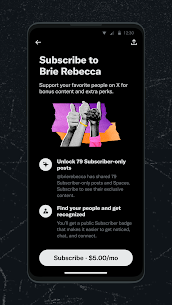
Remove “Creators to subscribe” Banner ➠ Removes “Creators to subscribe” block in timeline
Remove “Pinned posts by followers” Banner ➠ Removes “Pinned posts by followers” block in timeline
Remove “Revisit Bookmark” Banner ➠ Removes “Revisit your bookmark” block in timeline
Remove “Who to follow” Banner ➠ Removes “Who to follow” block in timeline
Remove Detailed posts ➠ Removes “Discover more” Banner in threads
Remove view count ➠ Removes the view count from the bottom of tweets
⭐ Premium:
Download patch ➠ Unlocks the ability to download videos and gifs
Enable app and nav icon settings ➠ Enable app icon and navbar customisation
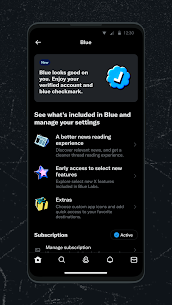
Enable Reader Mode ➠ Enables \”Reader Mode\” on long threads
Enable Undo Posts ➠ Enables ability to undo posts before posting
⭐ Downloads:
Custom download folder ➠ Change the download directory for video downloads
⭐ Link:
Add ability to copy video media link ➠ Add ability to copy video media link
Clear tracking params ➠ Removes tracking parameters when sharing links
No shortened URL ➠ Get rid of t.co short urls
⭐ Misc:
Custom sharing domain ➠ Change the domain to use when sharing tweets
Disable chirp font ➠ Disable chirp font (X’s default font) and use your phone’s default font
Dynamic color – Monet ➠ Dynamic color – Monet
Enable app downgrading ➠ Sets app version to a default value making installation of different versions possible
Enable debug menu for posts ➠ Enable debug menu for posts
Hide FAB ➠ Hides Floating Action Button
Hide FAB Menu Buttons ➠ Hides Floating Action Button menu buttons
Hide Recommended Users ➠ Hide recommended users that pops up when you follow someone
Hook feature flag ➠ Allows for adding custom feature flags
Hook for timeline entry ➠ Hook for timeline entry
Open browser chooser on opening links ➠ Open links with browser chooser instead of using the in-app browser
Round off numbers ➠ Enable or disable rounding off numbers
Selectable Text ➠ Makes bio and username selectable
Show sensitive media ➠ Permanantly hides the “Sensitive Media” warning
Adds settings ➠ Adds mod settings
Bring back twitter ➠ Bring back old twitter logo and name
⭐ Timeline:
Delete from database ➠ Delete entries from database(cache)
Disable auto timeline scroll on launch ➠ Disable auto timeline scroll on launch
Hide Banner ➠ Hide new post banner (Hide new posts pill)
Hide bookmark icon in timeline ➠ Hide bookmark icon in timeline
Hide Community Notes ➠ Hide Community Notes
Hide For You ➠ Hides For You tab from timeline
Hide immersive player ➠ Removes swipe up for more videos in video player
Hide hidden replies ➠ Hide hidden replies
Hide Live Threads ➠ Hide Live section in timeline
Hide promote button ➠ Hides promote button under self posts
Show poll results ➠ View poll results without voting
⭐ Customization:
Customize Inline action Bar items ➠ Customize Inline bar items to hide
Customize Navigation Bar items ➠ Customize Navigation bar items to hide
Customize profile tabs ➠ Customize Profile tabs to hide
Customize side bar items ➠ Customize Side bar items to hide
Customize timeline top bar ➠ Customize Timeline tabs
➠ Changelog:
– Features
● Twitter: Added Delete from database patch (d785660)
● Twitter: Added tab redirects hook (for Bookmark Navbar) (f01b418)
– Updates
● Improved the hooking of the recyclerview methods. also fixes the crash when opening feature flags. (25e5bc4)
● Enable Customize profile tabs patch by default (a8543bf)
● Enable Hide Live Threads patch by default (b9862b5)
– Bug Fixes
● Fix crash when opening feature flags (2b1484d)
– Refactors
● Twitter: Major string changes (f22fdf0)
➠ Patches:
✅ Add ability to copy media link applied
✅ Bring back twitter applied
✅ Clear tracking params applied
✅ Custom download folder applied
✅ Custom sharing domain applied
✅ Customize Inline action Bar items applied
✅ Customize Navigation Bar items applied
✅ Customize profile tabs applied
✅ Customize side bar items applied
✅ Customize timeline top bar applied
✅ Delete from database applied
✅ Disable auto timeline scroll on launch applied
✅ Disable chirp font applied
✅ Download patch applied
✅ Dynamic color applied
✅ Enable Reader Mode applied
✅ Enable Undo Posts applied
✅ Enable app downgrading applied
✅ Enable app icon settings applied
✅ Enable debug menu for posts applied
✅ Hide Banner applied
✅ Hide Community Notes applied
✅ Hide FAB applied
✅ Hide FAB Menu Buttons applied
✅ Hide Live Threads applied
✅ Hide Promoted Trends applied
✅ Hide Recommended Users applied
✅ Hide bookmark icon in timeline applied
✅ Hide hidden replies applied
✅ Hide immersive player applied
✅ Hide promote button applied
✅ Hook feature flag applied
✅ No shortened URL applied
✅ Open browser chooser on opening links applied
✅ Remove “Communities to join” Banner applied
✅ Remove “Creators to subscribe” Banner applied
✅ Remove “Pinned posts by followers” Banner applied
✅ Remove “Revisit Bookmark” Banner applied
✅ Remove “Who to follow” Banner applied
✅ Remove Ads applied
✅ Remove Detailed posts applied
✅ Remove Google Ads applied
✅ Remove message prompts Banner applied
✅ Remove view count applied
✅ Round off numbers applied
✅ Selectable Text applied
✅ Show poll results applied
✅ Show sensitive media applied
➡ Idiomas: Full Multi Languages
➡ Arquitecturas de CPU: arm64-v8a, armeabi-v7a, x86, x86_64.
➡ DPI de pantalla: 120 ppp, 160 ppp, 240 ppp, 320 ppp, 480 ppp, 640 ppp
➠ credit crimera
Descripción
X (TWITTER)

INTRODUCCIÓN
X (Twitter) is a powerful social media platform that allows Android users to connect, share, and engage with the world in real time. Unlike other apps that focus solely on photos or private chats, X (Twitter) thrives on immediacy—breaking news, trending discussions, and viral content all unfold here first. For Android users, the app is optimized to deliver a smooth, mobile-first experience, ensuring that you can participate in global conversations anytime, anywhere.
Whether you want to follow your favorite creators, join niche communities, or broadcast live video, X (Twitter) on Android provides the tools to make your voice heard. Its lightweight design, push notifications, and customizable features make it an essential app for anyone who values staying informed and connected.
PUBLIC CONVERSATIONS
One of the defining features of X (Twitter) is its ability to host public conversations that anyone can join. On Android, this experience is designed to be fast, intuitive, and engaging.
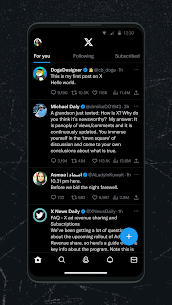
- Real-Time Updates: Tweets appear instantly on your feed, keeping you updated on breaking news, sports, entertainment, and politics.
- Trending Topics: The “Explore” tab highlights what’s trending globally or locally, allowing Android users to dive into the most relevant discussions.
- Engagement Tools: With likes, reposts, and replies, you can interact with content in seconds.
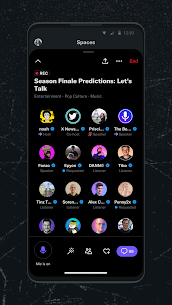
- Spaces Integration: Android users can join or host live audio conversations, adding another layer to public discussions.
This open format makes X (Twitter) a digital town square where Android users can share opinions, debate ideas, and discover new perspectives.
COMMUNITIES
While public conversations are open to everyone, X (Twitter) also offers Communities—spaces where Android users can connect with people who share specific interests.
- Focused Discussions: Communities allow members to post and interact within a dedicated group, making it easier to avoid the noise of the main feed.
- Custom Moderation: Community admins can set rules and manage discussions, ensuring a safe and relevant environment.
- Seamless Access on Android: The app’s interface makes it simple to switch between your main feed and community spaces without losing track of conversations.
For Android users, Communities provide a balance between the openness of public conversations and the intimacy of smaller, interest-driven groups. Whether you’re into tech, fitness, or literature, there’s likely a community waiting for you.
LIVE VIDEO
X (Twitter) on Android isn’t just about text and images—it also supports transmisión de vídeo en directo, giving users the ability to broadcast moments as they happen.
- Go Live Instantly: With just a few taps, Android users can start a live broadcast directly from the app.
- Interactive Streaming: Viewers can comment, like, and share during the broadcast, creating a two-way interaction.
- Event Coverage: From concerts to protests, live video on X (Twitter) has become a go-to tool for real-time coverage.
- Replay Options: Once a live stream ends, it can remain available for replay, ensuring your content reaches a wider audience.
For Android users, this feature transforms the app into a live broadcasting tool, making it easy to share authentic, unfiltered moments with the world.
DIRECT MESSAGING
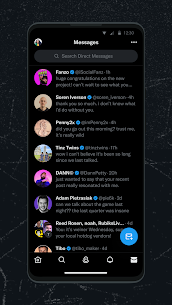
Beyond public and community interactions, X (Twitter) on Android also offers Direct Messaging (DMs) for private conversations.
- One-on-One Chats: Connect directly with friends, colleagues, or creators.
- Group Messaging: Create group chats to collaborate or discuss shared interests.
- Media Sharing: Send photos, videos, GIFs, and even voice messages seamlessly.
- Security Features: Options like message requests and spam filters give Android users more control over their inbox.
Direct Messaging makes X (Twitter) more than just a public platform—it also serves as a private communication tool, eliminating the need to switch between multiple apps.
TAMBIÉN TE PUEDE GUSTAR:
CONCLUSIÓN
X (Twitter) on Android is more than a social media app—it’s a dynamic platform that combines public conversations, niche communities, live video, and private messaging into one seamless experience. For Android users, the app’s design ensures speed, accessibility, and constant connectivity.
- Stay informed with real-time updates.
- Find your tribe through Communities.
- Broadcast live with video streaming.
- Connect privately with Direct Messaging.
In a world where information moves fast, X (Twitter) on Android ensures you’re never left behind. Whether you’re a casual user or a content creator, the app empowers you to engage, share, and shape conversations that matter.
Imágenes
Aplicaciones relacionadas





Últimas actualizaciones
-
 eEagle VPN v2.11.1 MOD APK (Premium desbloqueado)EAGLE VPN LIMITED
 -
 Lucky Patcher v11.9.8 APKChelpuS
 -
 OnePlayer v2.3.10 MOD APK (Premium desbloqueado)Herramientas Dovi
 -
 GreenTuber v0.1.8.3 MOD APK (Premium Desbloqueado)Maxsortube
 -
 Lupa Plus con linterna v4.8.16 MOD APK (Premium desbloqueado)Digitalchemy LLC
-